

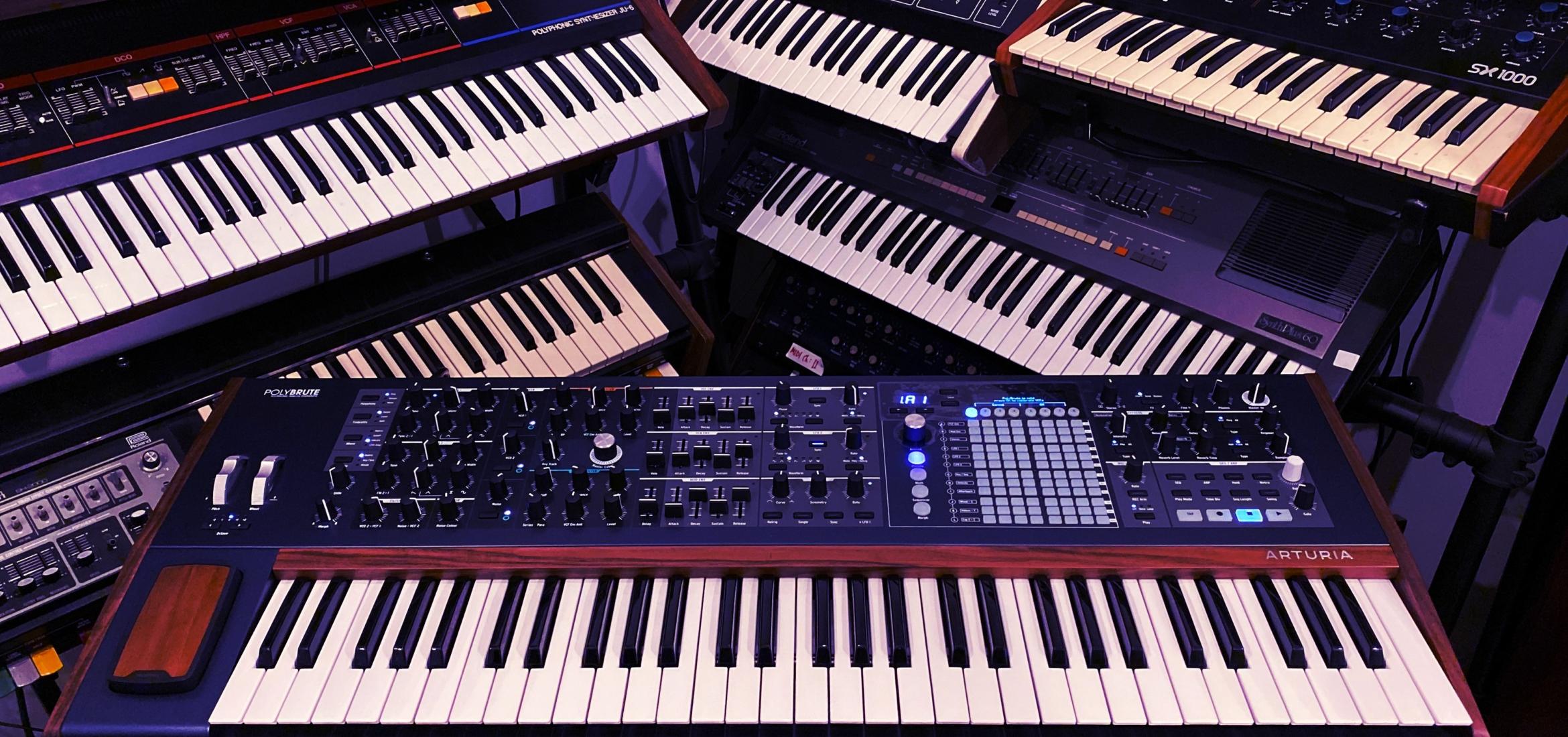
A keyboard piano can mean several different instruments, from a simple 61-key keyboard to an 88-key digital piano designed to feel like an acoustic piano. That variety is useful, but it can also make your first purchase confusing. This guide explains the differences in plain English, then moves into the technical details that matter when you are ready to compare models.
If you are a beginner, do not assume the most expensive instrument is automatically the right one. The best choice is the keyboard you will actually use regularly, fits your room, and supports the kind of music you want to play. In my view, a good buying decision comes from matching key action, size, sound, features, and budget rather than chasing the longest feature list.
Table of Contents
- What Is a Keyboard Piano?
- The Main Types of Piano Keyboards
- How Many Keys Do You Need?
- Key Action: The Feature Beginners Should Not Ignore
- Sound Quality and Polyphony
- Useful Features Versus Distractions
- How Much Does a Keyboard Piano Cost?
- New, Used, or Refurbished?
- A Practical Buying Process
- Common Buying Mistakes
- Final Recommendation
What Is a Keyboard Piano?
A keyboard piano is an electronic keyboard with piano sounds, although the phrase is used casually for several related products. Some instruments are mainly piano replacements, while others are all-purpose keyboards with hundreds of sounds, rhythms, lessons, and recording tools.
The important distinction is not the name printed on the box. It is how the instrument creates sound and how its keys respond beneath your fingers. A beginner who wants to learn piano technique needs different priorities from a producer who wants to enter notes into music software.
An acoustic piano creates sound mechanically when felt hammers strike strings. A digital piano uses sampled or modeled sounds played through speakers, while a portable arranger keyboard usually adds automatic rhythms, accompaniment, and many non-piano voices. A MIDI controller may have keys but produce no sound by itself; it sends performance information to a computer, tablet, or sound module.
The Main Types of Piano Keyboards
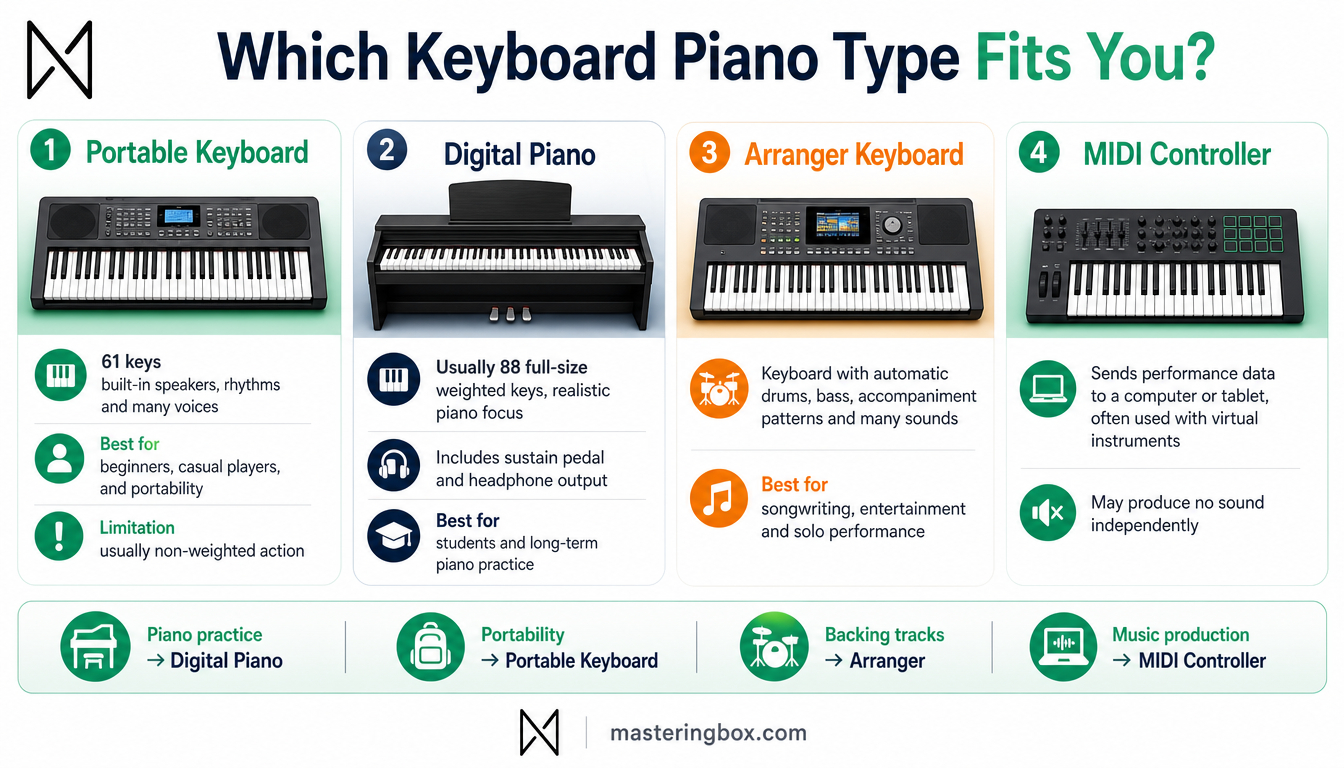
Understanding the main categories makes choosing a keyboard piano much easier because each type solves a different problem. Before comparing brands, decide whether your priority is realistic piano practice, portability, live performance, songwriting, or music production.
Portable Keyboard
Portable keyboards are usually the most affordable and flexible starting point. They commonly have 61 keys, built-in speakers, a headphone output, touch sensitivity, drum rhythms, accompaniment patterns, and voices such as organ, strings, bass, and synthesizer.
This is an excellent option for a child exploring music, a casual player, or someone who needs to carry an instrument between rooms. Yamaha’s PSR-E383, for example, uses 61 touch-sensitive keys and is designed for beginners and developing players. The compromise is that most portable keyboards use springy, unweighted action, so they do not feel like an acoustic piano.
Digital Piano
A digital piano focuses on reproducing the experience of a traditional piano. Most have 88 full-size keys, weighted action, built-in speakers, a sustain-pedal connection, and a headphone output.
Digital pianos suit students because they need no tuning, occupy less space than acoustic pianos, and often include recording, metronome, and app features. Casio also describes 88-key weighted digital pianos as a common fit for students and studio use, supporting my advice to prioritize the keys before decorative features.
Arranger Keyboard
An arranger keyboard combines a keyboard with an automatic backing band. You can play a chord with your left hand while the instrument supplies drums, bass, and accompaniment patterns, making it enjoyable for songwriting, solo performance, and entertainment.
Arrangers can be terrific creative tools, but a large number of rhythms does not guarantee a better piano-playing experience. Check the key response carefully, especially if your long-term plan involves classical pieces, exams, or lessons that require controlled finger dynamics.
MIDI Keyboard Controller
A MIDI keyboard controller is designed to operate software instruments rather than make sound independently. It connects by USB or another MIDI connection and can control piano plugins, synthesizers, samplers, recording software, and virtual orchestras.
Controllers are ideal if you already work on a computer and want maximum sound variety. However, a small controller with mini keys is not a substitute for an 88-key digital piano when your goal is traditional piano technique. Always check whether the controller includes full-size keys, velocity sensitivity, a sustain input, and the software compatibility you need.
How Many Keys Do You Need?
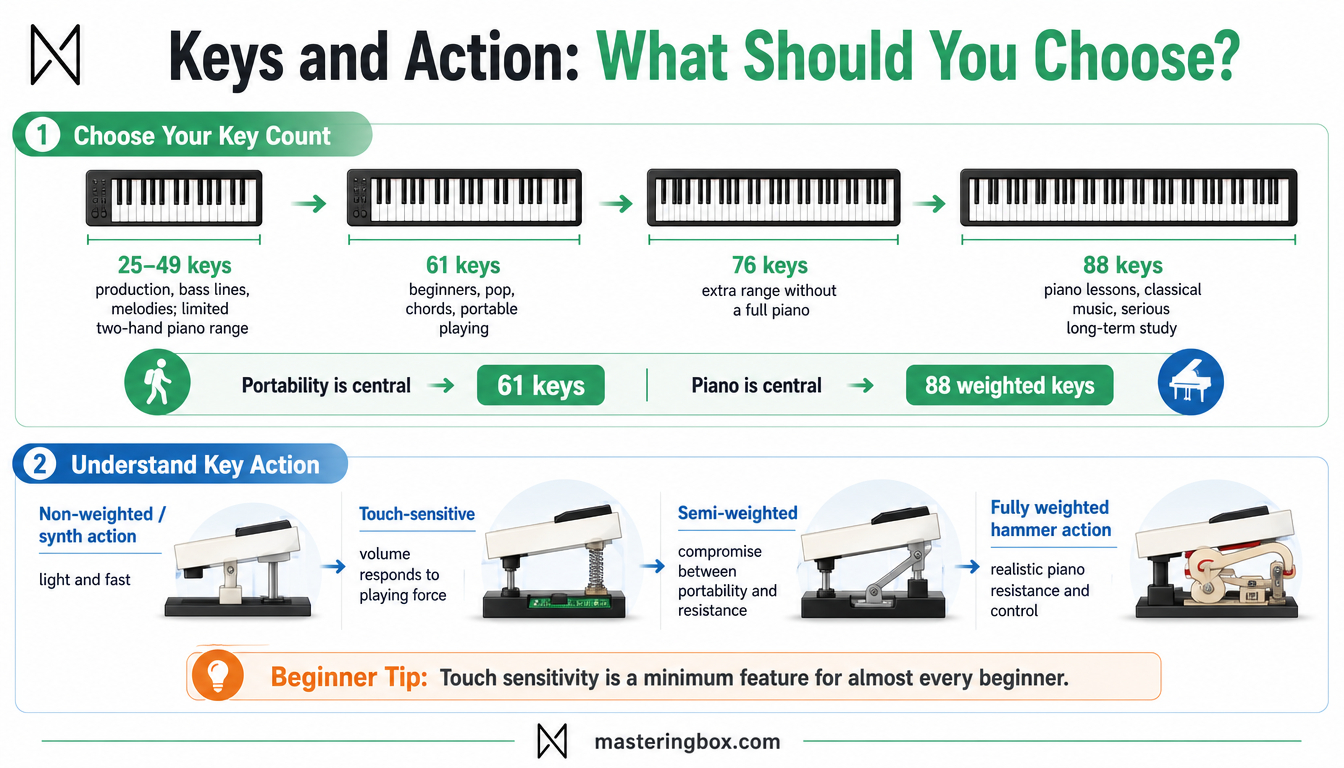
The number of keys affects your range, playing comfort, price, and available space. There is no universal answer, but the following breakdown gives beginners a reliable starting point.
| Key count | Best for | Main limitation |
|---|---|---|
| 25–49 keys | Production, bass lines, melodies, small desks | Limited two-hand piano range |
| 61 keys | Beginners, pop, chords, portable playing | Less room for low bass and high melody |
| 76 keys | Players wanting extra range without a full piano | Fewer choices and less compact than 61 keys |
| 88 keys | Piano lessons, classical music, serious long-term study | Larger, heavier, and usually more expensive |
A 61-key keyboard works well for notes, chords, scales, and many popular songs. It is sensible when money or space is tight, but choose full-size, touch-sensitive keys because touch response lets you control volume with your fingers.
An 88-key keyboard is the safer long-term purchase if you specifically want to become a pianist. The full range prevents you from constantly moving passages up or down an octave, and weighted action encourages a technique closer to an acoustic instrument. Full-size acoustic pianos use 88 keys, while many keyboard musicians choose smaller instruments for portability.
My rule is simple: buy 61 keys when portability is central, but buy 88 weighted keys when piano is central. A budget 61-key keyboard that gets played every day is better than an abandoned 88-key piano, yet a serious student can regret saving money on an action that feels like a toy.
Key Action: The Feature Beginners Should Not Ignore
Key action describes how the keys feel and respond. It is arguably more important than the number of voices, flashy screens, or the size of the sound library because your hands interact with the action every second you play.
Non-Weighted and Synth Action
Non-weighted keys use springs or lightweight mechanisms and return quickly after you press them. They are comfortable for quick melodies, organ parts, synth leads, and portable playing, but they provide little resistance compared with a piano.
This action is not automatically bad. It is simply designed for a different job. If you want to play pop keyboard parts, experiment with sounds, or learn basic chords, responsive non-weighted keys may be enough. If you want classical technique, repeated dynamic control, and realistic finger strength, look higher.
Touch-Sensitive Keys
Touch-sensitive keys respond to how fast or firmly you press them. A gentle press produces a quieter note, while a faster press produces a louder note. This is also called velocity sensitivity, and it is a minimum feature I recommend for almost every beginner.
Touch sensitivity is not the same as weighted action. A 61-key keyboard can respond to playing pressure without feeling heavy, while an 88-key digital piano can combine pressure response with hammer-style resistance.
Semi-Weighted Action
Semi-weighted keys add resistance without fully copying the mechanism of an acoustic piano. They can be a useful compromise for players who need portability but want more control than a lightweight synthesizer action provides.
Semi-weighted action is popular in MIDI controllers and some performance keyboards. It may feel comfortable for long sessions, though the exact experience varies widely. If possible, play the instrument in person, because the label alone does not tell you whether the keys feel smooth, noisy, shallow, or tiring.
Fully Weighted Hammer Action
Weighted hammer action uses a mechanism intended to imitate the resistance and movement of piano hammers. Many digital pianos also use graded weighting, meaning the lower keys feel heavier and the upper keys lighter, similar to an acoustic piano.
For a student, the benefit is not that heavier keys magically make you better. The benefit is that they encourage controlled movement, nuanced dynamics, and realistic coordination between both hands. They also make an eventual transition to an acoustic piano less surprising.
Sound Quality and Polyphony
Once the action is right, evaluate the sound. A convincing piano tone should remain pleasant at quiet volume, medium volume, and strong accents. Listen for whether notes become harsh, thin, or unnaturally metallic when you play chords across the keyboard.
Polyphony is the number of notes an instrument can produce at once. A specification such as 64, 128, or 256-note polyphony sounds impressive, but the practical result depends on sustain, layering, effects, and the complexity of the sound engine. For basic piano learning, moderate polyphony is usually sufficient; advanced layering and pedal-heavy playing benefit from more.
Built-in speakers matter more than beginners expect. Two instruments may use similar piano samples but sound very different because one has weak, boxy speakers and the other has a wider cabinet with better amplification. Try listening at low volume as well as loud volume, since many keyboards are used late at night with the volume turned down.
Useful Features Versus Distractions
Features should make practice easier, not become another distraction. Prioritize a metronome, recording function, split or layer mode, transpose controls, lesson compatibility, and a reliable headphone output before chasing novelty sounds.
Bluetooth audio can be convenient because you can play along with lessons or backing tracks without a separate cable. USB MIDI or USB audio can simplify recording, although the exact connection type varies by model. A sustain-pedal input is essential for piano playing, and a three-pedal unit becomes useful when you move toward more advanced repertoire.
Displays, illuminated buttons, accompaniment, and thousands of sounds can be fun, but they should not compensate for poor keys. Spend first on what you physically feel: action, key size, and stability.
How Much Does a Keyboard Piano Cost?
Keyboard piano prices vary substantially by key count, action, speakers, construction, software, and brand. Treat these figures as practical US buying ranges rather than permanent price promises, because promotions and model updates can change the market.
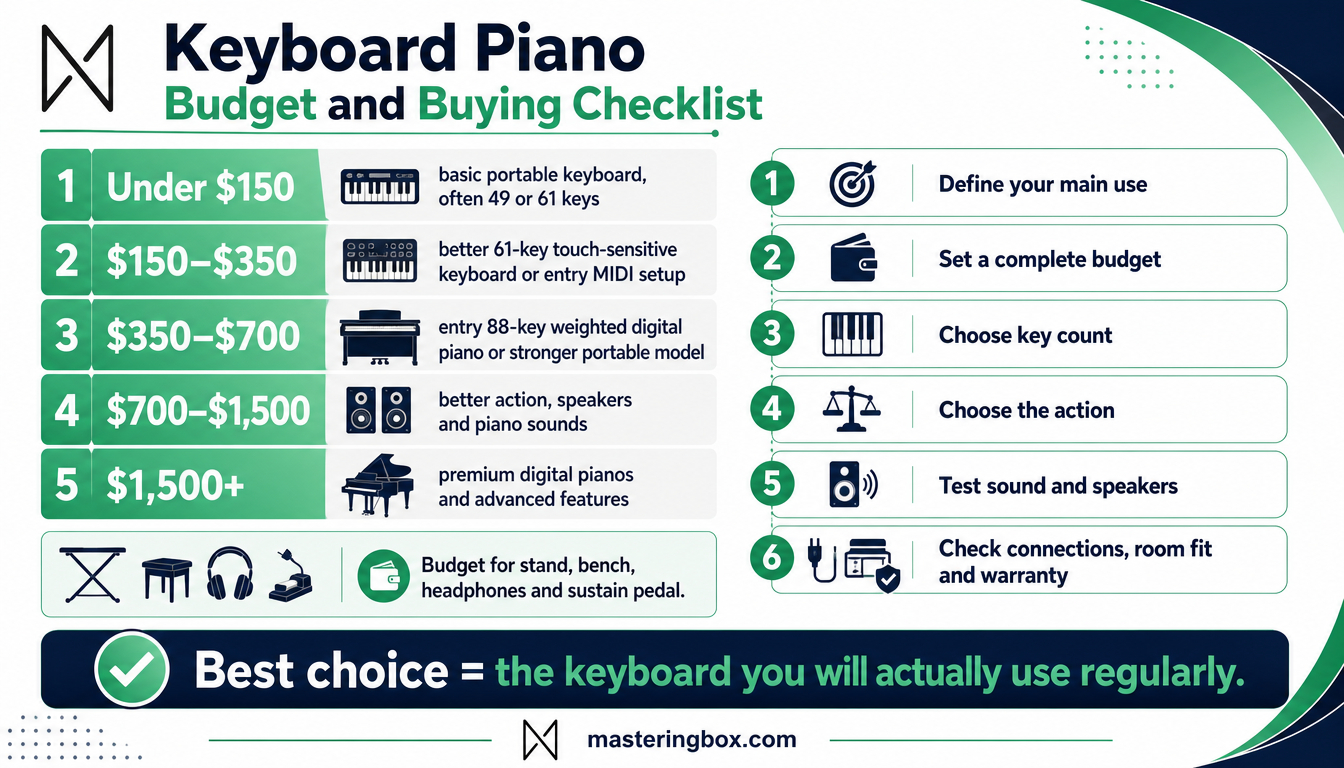
| Budget | What you can reasonably expect | Who it suits |
|---|---|---|
| Under $150 | Basic portable keyboard, often 49 or 61 keys | Casual exploration and children |
| $150–$350 | Better 61-key touch-sensitive keyboard or entry MIDI setup | Beginners, pop players, home recording |
| $350–$700 | Entry 88-key weighted digital piano or stronger portable model | Serious beginners and students |
| $700–$1,500 | Better action, speakers, piano sounds, furniture-style options | Long-term learners and home players |
| $1,500 and above | Premium digital pianos, stage instruments, advanced features | Performers and demanding players |
Remember to budget for accessories. A stand may cost $40–$150, a bench $50–$200, headphones $30–$150, and a better sustain pedal $20–$80. An 88-key digital piano may include a basic pedal, while a portable keyboard often needs an optional stand and pedal before it feels like a complete setup.
New, Used, or Refurbished?
Buying used can be an excellent way to get better keys within a beginner budget. Digital instruments do not need tuning, but they can still develop dead keys, noisy mechanisms, failing screens, damaged power supplies, or unreliable buttons.
When testing a used keyboard, play every key softly and loudly, check for cutout notes, test the headphone jack and speakers, and confirm the sustain pedal works. Inspect the adapter, listen for uneven clicking across an 88-key action, and look for damp-storage damage.
A reputable retailer with a return period is often worth paying slightly more for. The ability to return an uncomfortable keyboard matters because specifications cannot fully describe key noise, rebound, speaker character, or the size of the controls.
A Practical Buying Process
Choosing a keyboard piano becomes less stressful when you follow the same order every time. Start with your goal, then eliminate unsuitable categories before comparing individual models.
- Define your main use. Decide whether you want piano lessons, casual playing, songwriting, gigging, or computer production.
- Set a complete budget. Include a stand, bench, pedal, headphones, and possible delivery costs.
- Choose the key count. Select 61 keys for portability or 88 keys for serious piano development.
- Choose the action. Prefer touch sensitivity for nearly everyone and weighted hammer action for piano-focused students.
- Test the sound. Play single notes, chords, scales, and sustained notes through speakers and headphones.
- Check the connections. Look for sustain, headphones, USB, MIDI, and audio outputs that match your equipment.
- Measure your room. Leave enough space to sit comfortably, move your arms, and place the music stand or tablet.
- Compare the warranty. A dependable warranty and return policy can matter more than one extra sound or rhythm.
A Simple Test for Any Keyboard
Play a slow scale with one finger, then play the same scale using different pressures. Next, play a chord softly, repeat it loudly, and hold it with the sustain pedal. Finally, play a short melody while listening for uneven volume, distracting mechanical noise, or notes that feel harder to control than their neighbors.
You do not need advanced skills to notice these differences. A good beginner keyboard should make you want to repeat the test, while a poor fit feels tiring within minutes.
Common Buying Mistakes
Another mistake is buying the smallest instrument for a goal that requires range. A 25-key controller is convenient for a laptop desk, but it becomes frustrating when you try to play two-handed piano arrangements. Conversely, an 88-key console may be unnecessary if you mainly create beats and synth parts while traveling.
Beginners also underestimate ergonomics. A weak table can wobble, while an incorrect bench height encourages poor posture. Keep your elbows relaxed, wrists level, and feet close enough to reach the pedals comfortably.
Finally, do not delay playing while endlessly comparing specifications. Once an instrument meets your essential requirements, choose the model that feels inviting and start practicing. Consistent musical time will improve your results more than a premium feature you never touch.
Final Recommendation
For most beginners who want to learn piano, I recommend an 88-key digital piano with touch-sensitive, fully weighted hammer action, a sustain pedal connection, a metronome, headphones output, and dependable built-in speakers. That combination gives you the most room to grow without requiring an acoustic piano, and current beginner digital-piano ranges from major manufacturers commonly emphasize these same fundamentals.
If your budget, apartment, or travel schedule makes that impractical, choose a 61-key keyboard with full-size, touch-sensitive keys from a reputable brand. It is a genuine starting point, not a failure, especially for pop, chords, casual playing, and music production. Just understand that you may eventually want to upgrade when your repertoire needs more range or your technique benefits from weighted action.
The smartest keyboard piano decision is therefore personal but not mysterious: buy the right action for your hands, enough keys for your music, useful connections for your setup, and a price that leaves you excited rather than stressed. The best of all piano keyboards is the one that makes regular practice easy, enjoyable, and sustainable.
Om författaren

Dídac
VD & grundare av MasteringBOXDídac är ljudtekniker, musikproducent och mjukvaruingenjör. Han är grundaren av MasteringBOX och författare till många av artiklarna på bloggen.
Lämna en kommentar
Logga in för att kommentera
 English
 Español
 Français
 Italiano
 Deutsch
 Português
 Nederlands
 Svenska
 Polski
 Čeština