

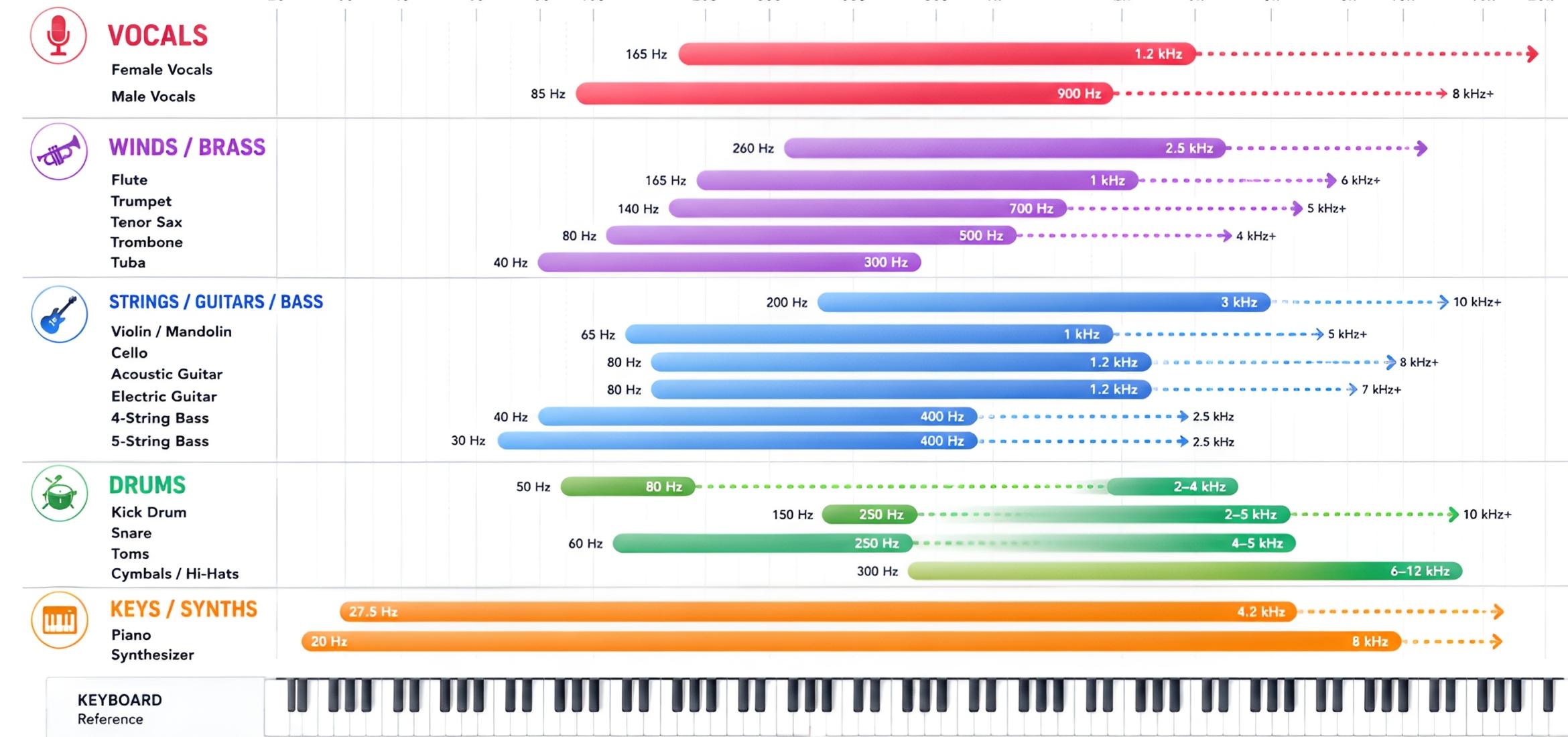
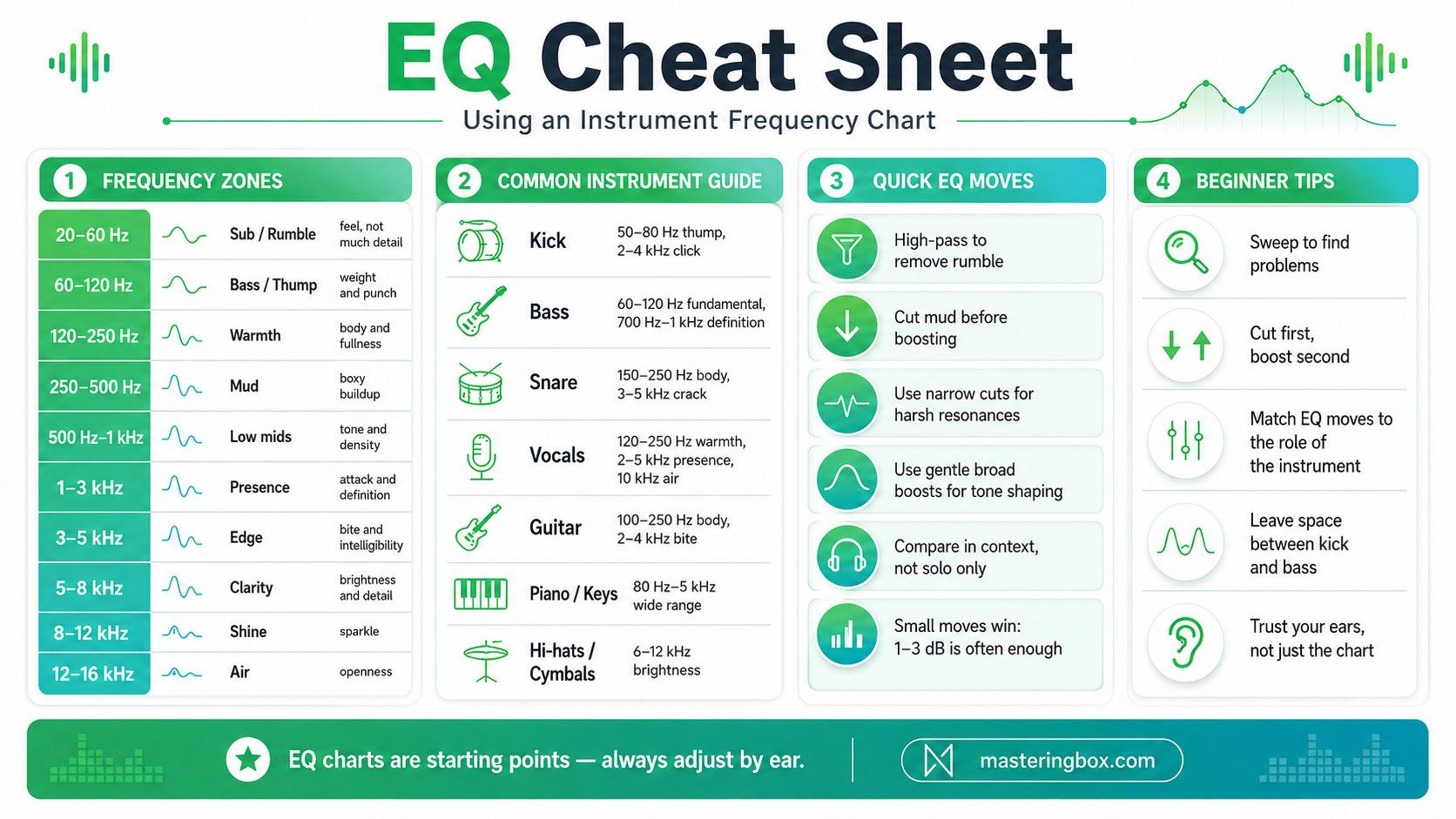
Getting a clean mix is easier with a map of where sounds live in the spectrum. An EQ cheat sheet – often based on an instrument frequency chart – shows you the typical frequency ranges and problem spots for each instrument. Think of it like a recipe: you get starting points for cuts and boosts so you’re not staring at an empty EQ wondering, “Where do I even begin?” In this guide we’ll walk through how EQ works, how to read an instrument chart, and give specific EQ tips for drums, bass, guitars, keys, vocals and more. Along the way you’ll see examples (and even a chart image!) to make these concepts concrete. By the end you’ll have a toolbox of practical tips – from beginner “training wheels” to more detailed techniques – so you can sculpt your sound with confidence.
Each section starts easy, defining terms and showing the big picture, and gets more technical as we go. We’ll use real-world examples and common mixing advice. Remember: these are guidelines, not hard rules. Always listen to your mix first and use your ears – the cheat sheet is there to speed you up, not replace your judgment.
Table of Contents
- What Is EQ and Why Frequency Matters
- Understanding an Instrument Frequency Chart
- Using the EQ Cheat Sheet in Your Mix
- Drum EQ Cheat Sheet
- Bass and Low-End EQ Cheat Sheet
- Guitar and String EQ Cheat Sheet
- Keyboard and Piano EQ Cheat Sheet
- Vocal EQ Cheat Sheet
- Strings and Brass (Orchestral Basics)
- Practical Tips and Troubleshooting
- Putting It All Together: Trust Your Ears
- Conclusion
What Is EQ and Why Frequency Matters
Before we jump into cheat sheets, let’s cover the basics. EQ (equalization) is the process of boosting or cutting specific frequency bands in an audio signal. In practical terms, it means you can carve out space or add tone to instruments. A low boost (say around 60 Hz) makes a kick drum thump harder, while a high cut (like around 5–8 kHz) can tame harsh cymbals. An EQ’s job is to shape the tonal balance of a track, helping each sound occupy its own “home” in the mix.
Every sound is made of frequencies – from the bass rumble at ~40 Hz to the shimmer above 10 kHz. When you EQ, you’re moving parts of that spectrum up or down. For example, cutting muddy 200 Hz muck can unclog a mix, and a gentle boost at 3 kHz can make vocals clearer. Boosting makes a frequency range more noticeable, while cutting reduces energy that is distracting, excessive, or masking another sound.
Because every instrument has a characteristic frequency range (based on how it’s made), understanding these ranges is key. For instance, a kick drum’s weight might sit around 50–100 Hz, whereas a trumpet’s bite might live around 2–5 kHz. If you know those “home” frequencies, you know where to look when something sounds off. That’s the idea behind an instrument frequency chart – it’s a visual guide to where instruments live on the frequency spectrum. We’ll get to charts in a moment, but first remember: EQ is a powerful mixing tool, not a fix for a bad recording. A good recording is your foundation; EQ simply helps polish it.
Understanding an Instrument Frequency Chart
An instrument frequency chart is a visual cheat sheet that shows where common instruments live on the frequency spectrum. Think of it like a map of a city, where each instrument has its own neighborhood. On the chart above, each colored bar (or set of bars) represents one instrument. The bottom of the bar is the fundamental (the lowest note, or pitch), and the length of the bar shows how far its harmonics reach up the spectrum. For example, you might notice that the bass guitar (green) sits down in the 40–150 Hz range, while vocals (red or purple) dominate the midrange around 200–2,000 Hz.
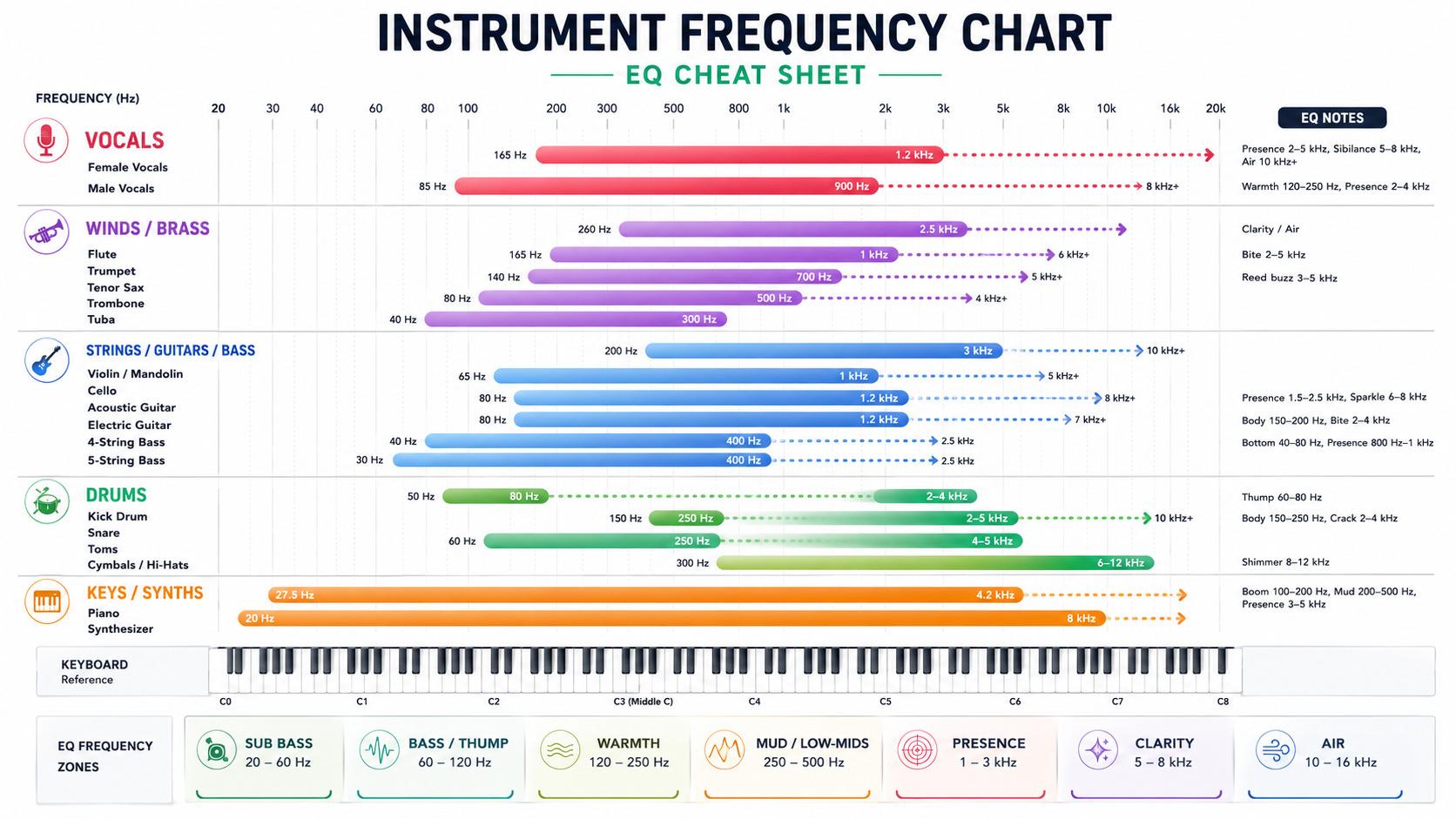
Why is this useful? When you can “see” that two instruments overlap, you know they might mask each other. For instance, if both the electric bass and bass drum have strong energy around 80–100 Hz, they could compete for the same space. By using the chart as a guide, you can decide to EQ one down and the other up, giving each its own room. In short, the chart is your EQ cheat sheet: it tells you where to start listening. A useful chart turns those overlapping frequency profiles into something you can scan quickly, helping you identify where masking may occur before you start making EQ moves.
Key Tip: Don’t treat the chart as law – use your mix context as the final judge. The chart is only a starting point; the final call should come from your ears and what fits the song. Always listen to how everything sounds together, not in isolation. As a training tool, though, the chart can teach you where each instrument’s main sweet spots and problem zones usually are.
Using the EQ Cheat Sheet in Your Mix
Before jumping to specific instruments, let’s cover some general strategies:
- Plan Your Frequency Space. Imagine your mix as a bookshelf, and each instrument needs its own shelf. If too many parts carry most of their energy in the same range, EQ has to work much harder and the result can start sounding unnatural. In practice, avoid stacking several dense instruments in the same area. For example, two dark guitars and a bass can quickly overcrowd the 100–250 Hz region.
- High-Pass and Low-Pass as First Aid. Most parametric EQs have built-in filters. Use a high-pass filter (HPF) on instruments that don’t need sub-bass. On many guitars and vocals, you can start somewhere around 70–100 Hz and adjust by ear. Conversely, a low-pass filter can tame unnecessary top end on dark bass sounds or synth layers. These filters remove broad areas that are not helping the arrangement, but only cut what you actually need. Over-filtering can rob a sound of weight and character.
- Subtractive EQ First. It’s often easier to remove the frequency causing a problem than to boost several other areas around it. If something sounds boxy or honky, try a small cut first. This keeps level buildup under control and usually leads to simpler EQ curves. Orphiq’s vocal EQ cheat sheet makes a similar subtractive-first case for vocals: clean up the problem, then boost only what is genuinely missing.
- Use Narrow Q for Cuts, Wider Q for Boosts. When you find a specific resonance, a narrow notch can reduce it without changing too much of the surrounding tone. For broader tone shaping, a wider bell usually sounds more natural. Beginners can remember it like this: narrow and controlled for problems, wide and gentle for color.
- Reference and Sweeping. If you’re not sure what frequency to cut, sweep a narrow boost around to find the ringy spot, then turn that boost into a cut. Set a parametric band with a tight Q and temporarily raise the gain, play the track, and move the band slowly until an unpleasant tone becomes obvious. Then reduce the gain at that point and widen the Q if the cut sounds unnatural. This is useful for needle-in-a-haystack problems, such as a resonant peak around 450 Hz in a guitar.
With those principles in mind, let’s build our cheat sheet by instrument. Each section below starts with a quick intro, then bullet-list “cheat” moves with rationale and examples.
Drum EQ Cheat Sheet
The drum kit often sets the groove, so it’s a good place for our EQ training wheels. We’ll cover the main elements: kick, snare, toms, and cymbals/overheads.
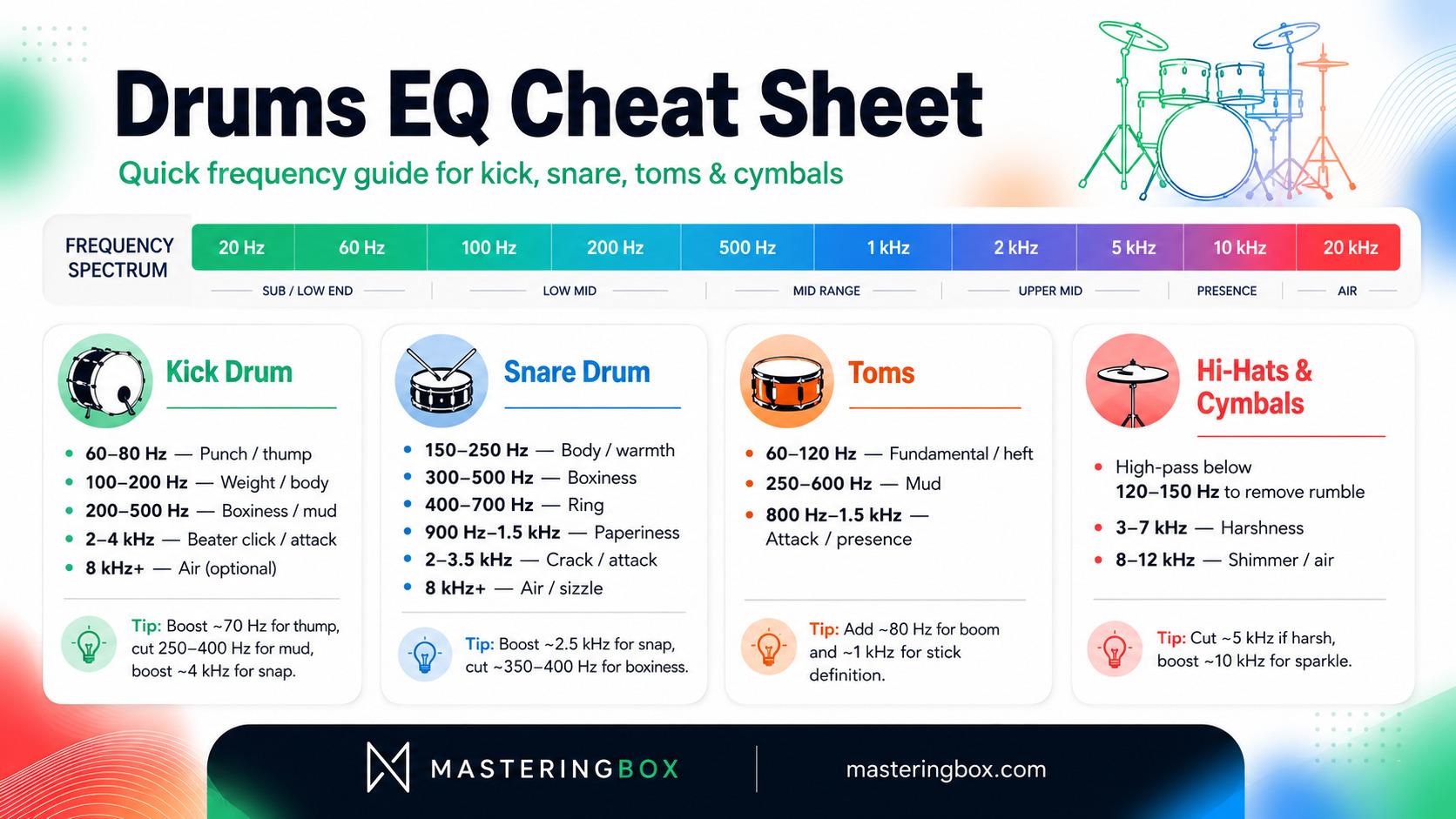
Kick Drum
Kicks give the track thump and weight. Their key frequencies are:
- 60–80 Hz – Low-End Punch: Boosting here makes the kick thump in your chest. This is the kick’s fundamental weight. Many rock and pop kicks get their power by a bump in this subrange.
- 100–200 Hz – Knock/Weight: A gentle boost around 100–150 Hz adds warmth and body to the kick. This is the “meat” of the sound. (However, too much here can make it muddy if the bass is also heavy.)
- 200–500 Hz – Boxiness/Muddiness: If the kick sounds boxy or muddy, search this area for excess buildup. A small cut, often around 1–3 dB, can tighten the sound without removing its weight.
- 1–5 kHz – Beater Click/Attack: This is the “slap” or “click” of the drum beater hitting the head. A boost around 2–4 kHz will make the kick’s attack more audible (helps it cut through a busy mix). Use this sparingly; too much can sound clicky or thin.
- 8 kHz and above – Air/Thinner: Some engineers add a tiny shelf boost high up (8–12 kHz) for “air” if needed. But often kicks don’t need super high frequencies unless you want a bit more hiss or beater sound.
Example: If your kick sounds too soft, try a +3 dB boost at ~70 Hz and a +2 dB around 4 kHz to get some snap. If it’s muddy, try cutting 250–400 Hz by 2–3 dB.
Snare Drum
The snare sits in the midrange and needs both body and snap. Look at these ranges:
- 150–250 Hz – Body/Warmth: Boosting around ~200 Hz gives the snare more fullness and weight. This makes the snare sound bigger or “fatter.” But be careful: too much can conflict with vocals or guitars.
- 300–500 Hz – Boxiness: If the snare sounds muffled or muddy, cut a little in this band. Even a -2 dB move around ~400 Hz can clarify it.
- 400–700 Hz – Ring: Snares often ring in the midrange. If you hear a lingering pitched tone, sweep this area and apply a narrow cut where the ring becomes most obvious.
- 900–1,500 Hz – “Paperiness”: A weak, papery sound (lacking snap) often lives around 900 Hz–1.5 kHz. You can either cut this if it’s ugly, or even boost it slightly if the snare sounds too dull (this can make it sound like hitting cardboard, in a good way).
- 2–3.5 kHz – Attack/Crack: Boosting here adds crack and helps the snare cut through. This is where the “slap” of the stick is. A small boost (1–2 dB) makes it more present.
- 8 kHz and above – Snares & Air: Snares and their wires add brightness up top. A gentle shelf boost above 8 kHz can add air and sizzle to a snare. This is optional.
Example: If the snare lacks snap, try boosting 2.5 kHz. If it’s too boxy, notch out 350 Hz. Also, always high-pass a snare to remove sub-80 Hz rumble.
Toms
Tom frequency respobnse varies by size, but general tips are:
- 60–120 Hz – Fundamental: Boost this for tom heft. Smaller toms are higher in this range, big floor toms lower. Around 80 Hz often adds boom.
- 250–600 Hz – Muddiness: This is where toms can get muddy. A cut here can clean up a boomy tom, similar to snares.
- 800 Hz–1.5 kHz – Attack/Presence: Boosting here emphasizes the stick hit, adding pop and helping the toms cut. It makes them snap in the mix.
Toms are very musical, so use subtle boosts/cuts. For a punchy rock tom sound, a slight bump around 80 Hz and a gentle lift near 1 kHz often does wonders.
Hi-Hats and Cymbals
High-frequency percussion provides sheen and air:
- 3–7 kHz – Potential Harshness: Open hats often have plenty of sizzle, but this range can become annoyingly sharp. If the hats or cymbals bite too much, a small cut of around 1–2 dB can tame them. On recorded drums, be gentle because hat microphones may contain snare bleed and overheads capture the whole kit.
- 8–12 kHz – Air/Shimmer: Cymbals and hi-hats have a lot of content up here. A subtle boost around 10 kHz can add shimmer and clarity. In contrast, if your cymbals are too bright, you might instead cut above 10 kHz with a shelf.
- Below 150 Hz – Low Rumble: Most of the useful detail in hats is well above the bass range. It’s common to high-pass dedicated hat microphones, and sometimes overheads, to reduce low-frequency spill. Set the cutoff while listening to the full kit so you don’t make the cymbals or room sound unnaturally thin.
Example: If your hats sound piercing, try a -1 dB cut at 5 kHz. If they sound dull, try +2 dB around 10 kHz. And yes, use an HPF at ~120 Hz to keep the lows clean.
Bass and Low-End EQ Cheat Sheet
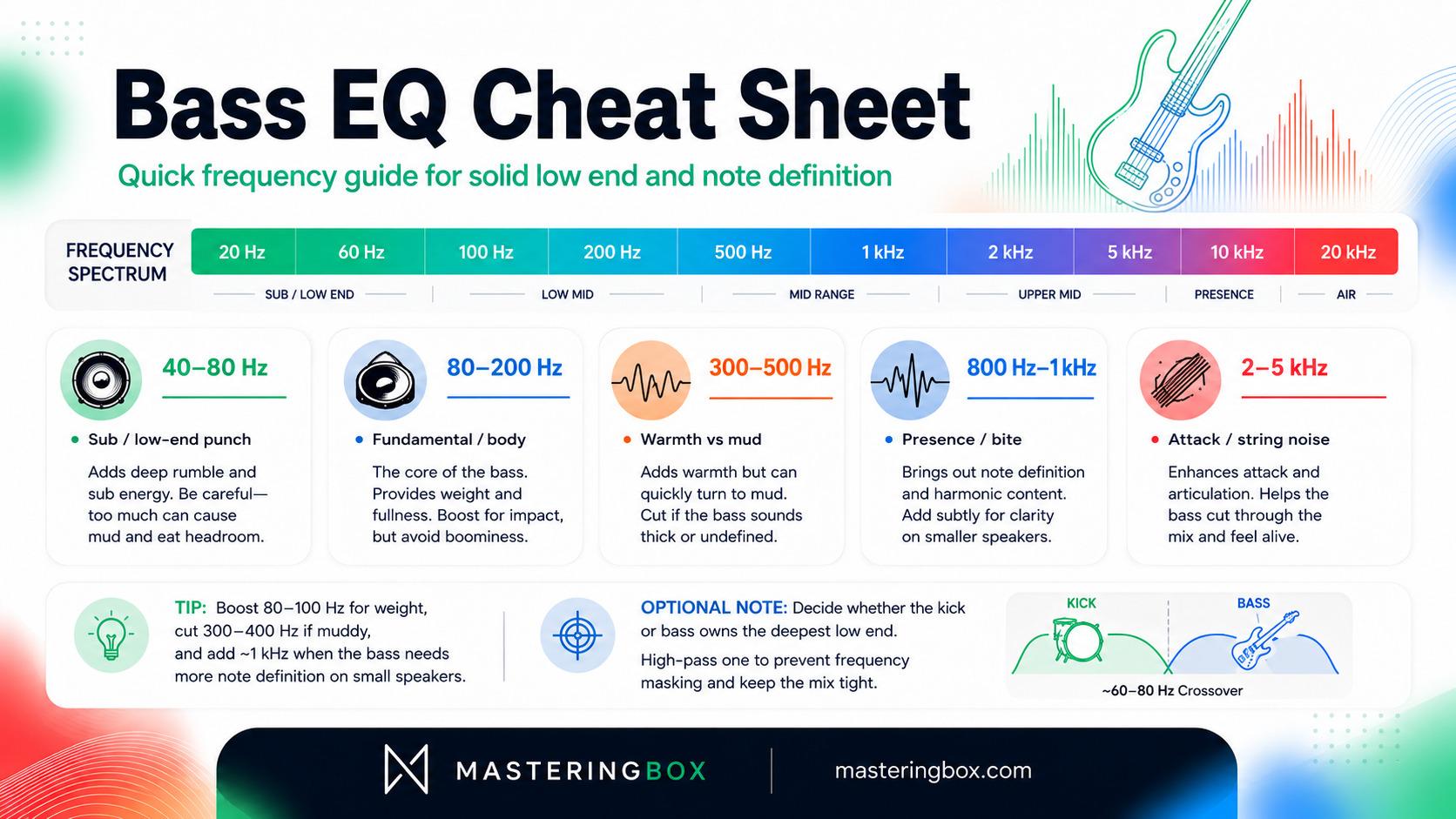
The bass (electric or synth) anchors your groove with low frequencies. It often sits in the same realm as the kick, so these tips are crucial:
- 40–80 Hz – Low-End Punch: This is where the very bottom of the bass lives. Boosting near 60 Hz adds a deep rumble or “sub” presence. This can make the bass feel bigger. However, it can also conflict with the kick. If the bass is overwhelming the kick, consider cutting a little here or choosing which one takes the lead.
- 80–200 Hz – Fundamental/Body: The main body of many bass parts lives around 80–120 Hz. Boosting here emphasizes the bass line itself. If the bass sounds boomy, a gentle cut toward 150–200 Hz can clean it up without removing the deeper fundamental.
- 300–500 Hz – “Mud” and Warmth: This is a double-edged area. Some richness resides here, but too much makes the bass sound muffled. A slight boost around 400 Hz can add warm fullness, especially to an upright or lightly driven bass. If the sound is congested, though, a small cut may work better.
- 800 Hz–1 kHz – Presence/Bite: Boosting around 800 Hz–1 kHz can bring the bass forward. This range helps listeners follow the notes on smaller speakers and can emphasize the character of fingerstyle or slap playing. A modest boost of 1–3 dB is often enough.
- 2 kHz and above – Attack/Noise: Beyond 2 kHz, bass guitar contains more pick, finger, fret, and string detail. Sonicbids’ instrument EQ guide describes 2–5 kHz as a string-noise area. Cut it if the attack is distracting, or retain some of it when the bass needs definition on small speakers.
Example: In a hip-hop mix, boosting 80–100 Hz on a bass synth can thicken it, while cutting 300–400 Hz cleans muddiness. For a clean vocal-forward mix, you might cut 100-200 Hz to tighten the bass if the kick needs more room.
Guitar and String EQ Cheat Sheet
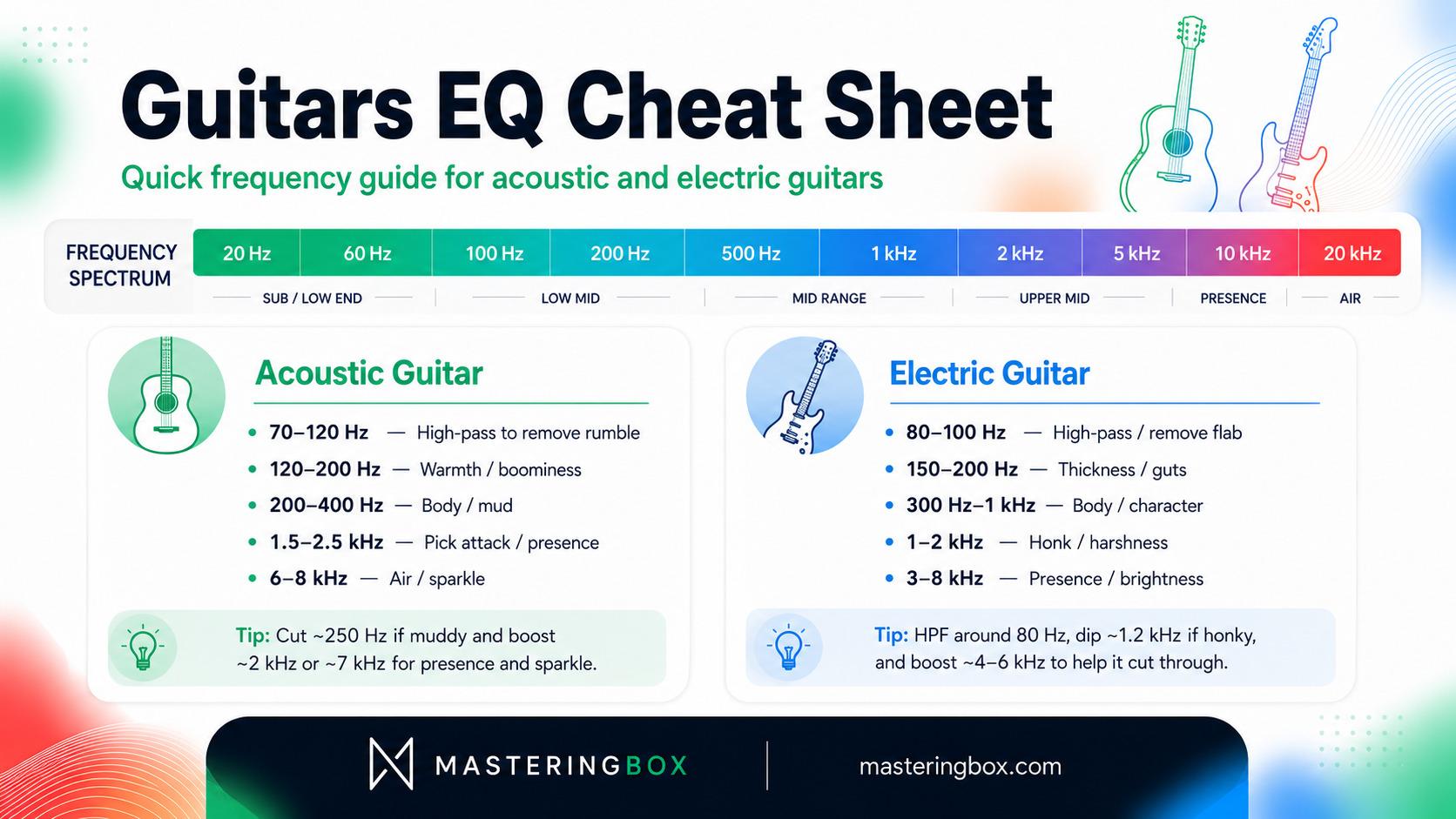
Guitars and string instruments occupy a wide part of the midrange, which means they can easily compete with vocals, keyboards, and even the body of the bass. This section of the EQ cheat sheet will help you control unwanted rumble, reduce muddy or honky tones, and bring out the attack, clarity, and sparkle that let each part sit naturally in the mix. Acoustic and electric guitars need different treatment, so we’ll look at them separately before covering some basic EQ ideas for orchestral strings and brass.
Acoustic Guitar
Acoustic guitars have lots of midrange “body” and high sparkle:
- Below 70–120 Hz – Unnecessary Rumble: A mic’d acoustic often does not need deep sub-bass in a full arrangement. Start the high-pass filter low, then raise it until the guitar becomes cleaner without losing its natural body.
- 120–200 Hz – Boominess: Boosting a little here adds warmth and fullness, but too much can become disruptive in a band mix. The same Sonicbids guide notes that this range may sound attractive on a solo acoustic yet clash once the arrangement fills out. If the guitar sounds overly woody or fuzzy, try a slight cut in this band.
- 200–400 Hz – Body/Wood: This is a major part of an acoustic guitar’s body. Often you’ll leave it alone or make very gentle moves. Cutting around 250–350 Hz can reduce muddiness when several midrange instruments are playing together.
- 1.5–2.5 kHz – Presence/Harshness: Boosting around 1.5–2 kHz brings out pick attack and clarity. This is often where strumming definition sits, but it can also become aggressive. If the acoustic is brittle, cut a touch here instead.
- 6–8 kHz – Air/Sparkle: A small shelf boost around 7–8 kHz can give the acoustic guitar an open, airy sheen. Just a few dB can highlight the string noise and “air.” Be cautious: boosting the very top end emphasizes finger noise and room, which may or may not be desirable.
Example: If a recorded acoustic feels dull, try a +2 dB shelf at 7 kHz and maybe +1 dB at 2 kHz for presence. If it’s muddy, cut 250 Hz by 2–3 dB. Always listen to how it sits with other rhythm instruments.
Electric Guitar
Electric guitars depend heavily on amps and pedals, but general EQ guidelines are:
- Below 80–100 Hz – Mud: Almost nothing useful lives here for electric guitar. It’s safe to HPF at 80 Hz (or even 100 Hz). Cutting this with a high-pass filter removes unnecessary low-end that just adds boom or flab.
- 150–200 Hz – Thickness (“Guts”): This band gives body to the guitar tone. Boosting here can make rhythm parts sound fuller; cutting can slim them. If the guitar is too boomy or clashing with bass, consider trimming 150-200 Hz.
- 300–1,000 Hz – “Life”/Character: Much of an electric guitar’s recognizable body and character lives through the mids. The Sonicbids guide describes 300–1,000 Hz as an especially important character range. Avoid automatically scooping it, because deep cuts can make guitars hollow. If the tone sounds honky or nasal closer to 1–2 kHz, a slight dip may help.
- 1,000–2,000 Hz – Honk: The region around 1–2 kHz can make guitars sound harsh or “honky.” A moderate wide cut in this band often smooths a scratchy amp tone.
- 3,000–8,000 Hz – Brilliance/Presence: Boosting here adds shimmer and helps the guitar cut through. For a bright lead or to make guitar sit in a dense mix, a lift around 4–6 kHz can add presence. On the other hand, if the guitar competes with vocals, you might cut 3–5 kHz to create space. Remember that too much boost here also emphasizes noise from distortion pedals or amp hiss.
Example: A classic rock guitar might be HPF’d at 80 Hz, have a gentle dip at ~1.2 kHz to remove boxiness, and a small +3 dB boost around 5 kHz for cut. If it’s in a busy mix, cutting 500 Hz slightly can reduce mud. If soloing in a band, a little extra bass (150 Hz) and presence (5 kHz) can help it shine.
Keyboard and Piano EQ Cheat Sheet
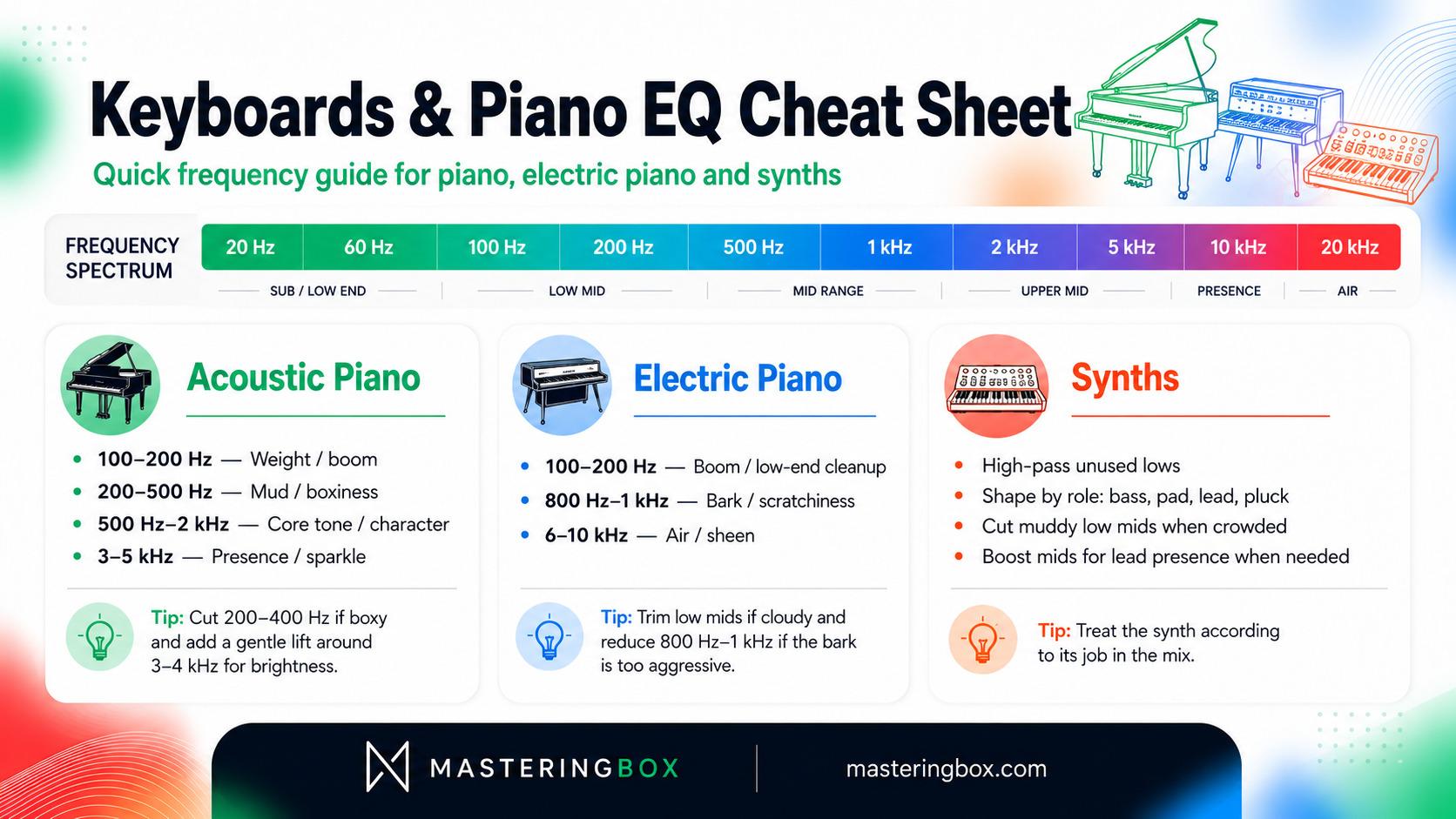
Pianos, electric keyboards, and synths can cover almost the entire frequency spectrum, so their ideal EQ depends heavily on the role they play in the arrangement. A solo piano may need deep lows and plenty of detail, while the same instrument in a busy mix might need to be narrowed considerably. This part of the EQ cheat sheet explains how to manage boom, mud, midrange character, and top-end sparkle while leaving enough room for vocals, guitars, bass, and drums.
Acoustic Piano
Pianos cover an enormous range, so they often get EQ’d down to size:
- 100–200 Hz – Boom/Weight: The low end of a piano can get boomy. If a piano is overpowering, try cutting around 100–150 Hz. This takes away unneeded boom. However, a small boost here can give warmth if the piano sounds too thin.
- 200–500 Hz – Mud: Many punch-through issues with piano come from the midrange. If the piano sounds “boxy” in a mix, try cutting 200–400 Hz. This often frees up space for guitars or vocals.
- 3,000 Hz and above – Air/Presence: Adding a bit of high-end shelf (around 3–5 kHz) makes a piano sparkle. Use a gentle touch, as too much will highlight hammer noise or make it tinny. But a light lift can brighten a dark piano tone.
- Midrange (500 Hz–2 kHz): Be cautious here. This is where much of the piano’s character lives. Often it’s best left alone unless something stands out as honky or muddy.
Example: To thin out a boomy upright piano, roll off below 80 Hz and cut 200 Hz by a couple dB. To add life to a muffled piano, try +2 dB at 3.5 kHz.
Electric Piano (Rhodes, Wurlitzer)
- 100–200 Hz – Boom: Like acoustic pianos, electric pianos can get muddy low end. Cut 100–200 Hz to remove boom. Especially Rhodes, which has dense harmonics, often benefit from thinning at 150 Hz.
- 800–1,000 Hz – Bark/Damper Noise: Clav/E-Pianos can have “bark” (sharpness) around 800–1000 Hz due to the pickup or dampers. If it sounds scratchy, cut in this region.
- 6–10 kHz – Air: A bit of top-end can add sheen to an electric piano. But again, watch for hiss.
Synths and Electronic Instruments
Synths and electronic instruments are flexible, but you can often apply acoustic concepts:
- Assign Roles: If a synth is bass-like (sub synth), treat it like bass: boost low fundamentals, cut mids if muddy. If it’s a lead pad, find its dominant frequencies (maybe analogous to strings or brass) and shape accordingly.
- High Fundamentals: Synth leads that operate in the high registers may carry unwanted lows. Use high-pass filters to clean up anything below their fundamental tone.
- Fundamental Focus: When a synth imitates a recognizable instrument, use that instrument’s natural register as a starting point. For example, an FM brass lead should still have a useful fundamental and presence range similar to the brass sound it is trying to evoke.
- Wavetables/Harmonics: Remember electronic sounds can have harmonics in unusual places. Always listen. But as a rule of thumb, if a synth is busy in the lows, cut it if it’s muddy. If it lacks presence, find its sweet spot in the mids and boost gently.
The cheat sheet for synths is very context-dependent. Use your ear and refer to similar acoustic instruments. For example, a synth brass line can be treated like orchestral brass. A plucked synth (like a 8-bit lead) might get a little bite at 2–4 kHz.
Vocal EQ Cheat Sheet
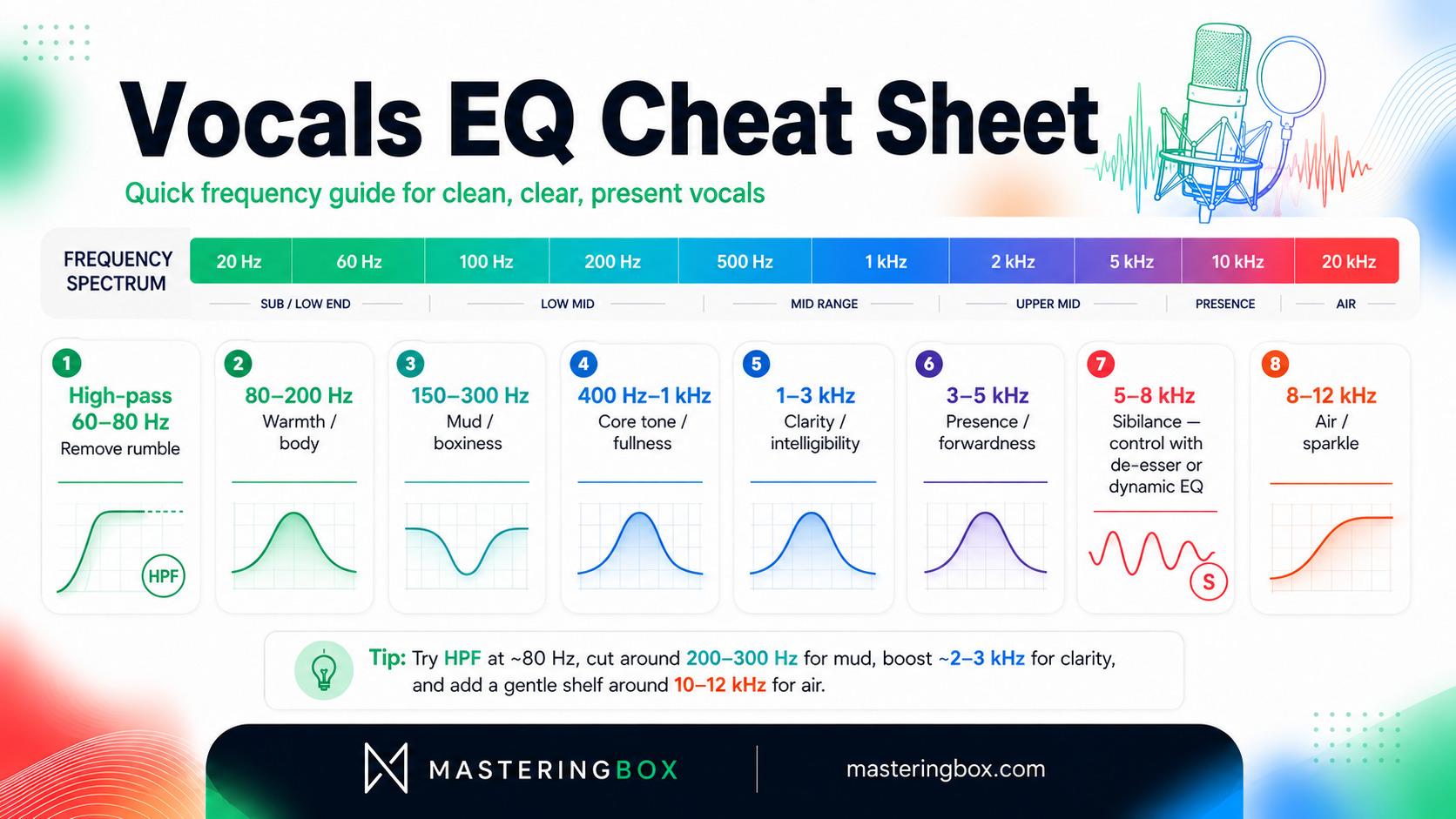
Vocals are usually the centerpiece, so clarity is crucial. Here are common steps (with males and females as general guide):
- Below 80 Hz – Remove Rumble: Use a high-pass filter around 60–80 Hz. At most, reduce any mic handling, air conditioners, or vibration here. This cleans up the low end and frees headroom.
- 80–200 Hz – Body vs. Mud: Boosting a bit here can add warmth, but often vocals get boomy in the 150–200 Hz range (especially if the mic was too close). If the voice sounds “muddy” or “boxy,” try cutting a couple dB in 150–300 Hz. This is where “head-cold” resonance lives.
- 400–1,000 Hz – Fullness: This midrange band contains much of the core vocal tone. Typically, leave it mostly flat because deep cuts can make the voice sound thin. Only make a move when you hear a specific problem.
- 1,000–3,000 Hz – Clarity/Intelligibility: This region carries intelligibility and presence. A gentle boost around 2–3 kHz can help the vocal cut through and make lyrics clearer. Be careful, because too much can make the voice nasal or aggressive. The Orphiq guide recommends keeping presence boosts modest, often within 1–3 dB.
- 3,000–5,000 Hz – Presence/“Air”: Adding a small bump in 3–5 kHz can make the voice more forward and exciting. However, this overlaps with sibilance (next item). Often you find this range by ear: if the vocal feels distant, a tiny boost here helps it pop.
- 5,000–8,000 Hz – Sibilance/Treble: This is where many “s” and “t” sounds become prominent. If the singer is harsh, use a de-esser or dynamic EQ in this range rather than applying a heavy static cut. When sibilance is already controlled, a gentle lift near the top of this band can add sheen.
- 8,000–12,000 Hz – Air: A small shelf boost above ~10 kHz adds air and sparkle. This can make vocals sound more open, but it also raises breath, room tone, and noise. Start with a very gentle shelf of around 1–2 dB.
Example: For a bright female pop vocal, you might HPF at 80 Hz, cut 250 Hz (muddiness), add +2 dB at 3 kHz (presence), and a +1 dB shelf at 12 kHz (air). If an s is too sharp, you’d cut around 6-7 kHz with a narrow EQ or use a de-esser.
Remember, every voice is different. Use these ranges as starting points, not rules. Always trust what sounds good in context.
Strings and Brass (Orchestral Basics)
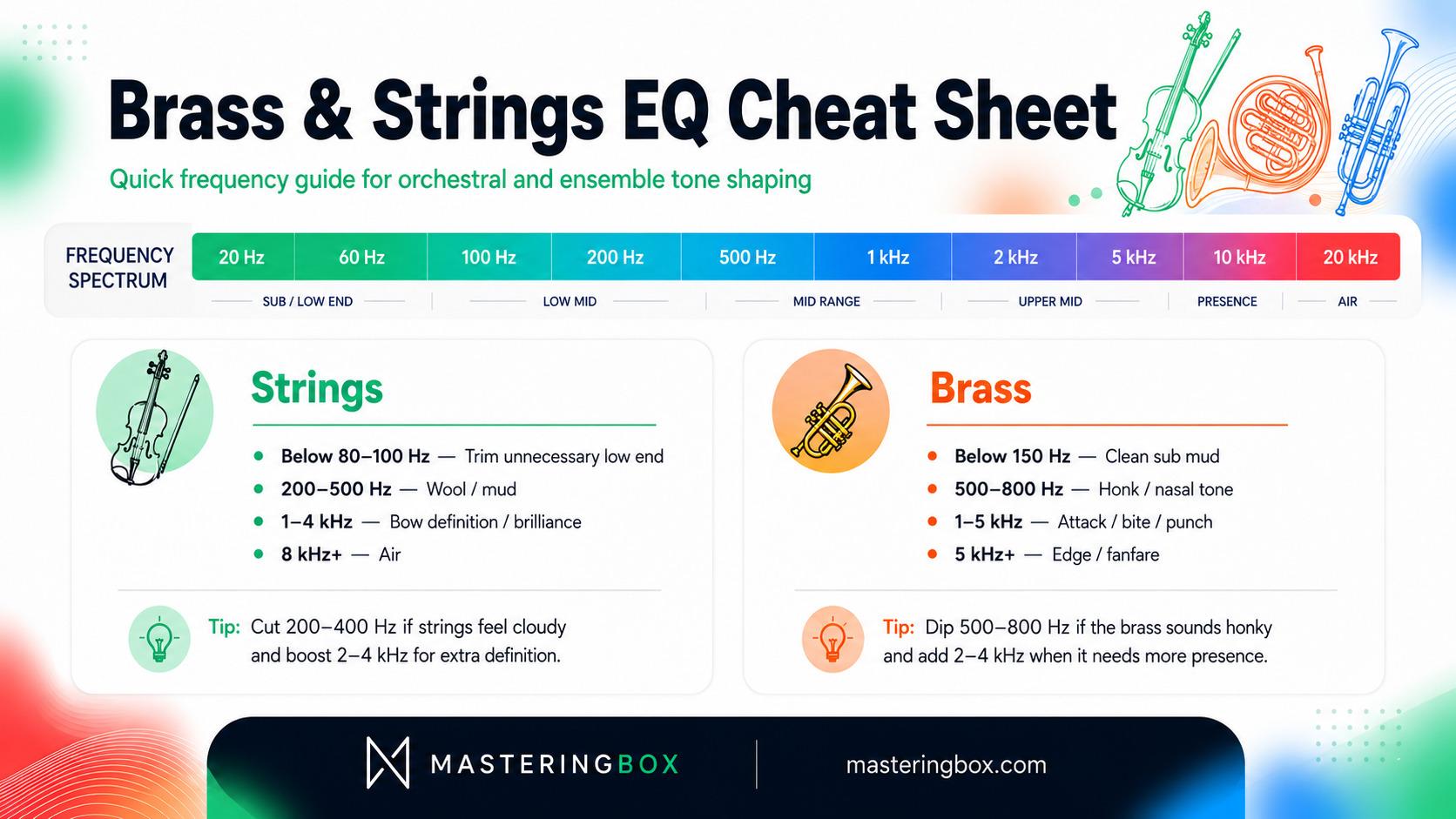
If you mix orchestral or big band elements, a quick chart reference:
- Strings (violins, cello, etc.): Fundamentals below 100 Hz can often be trimmed, as very low notes are rarely needed. Muddiness shows up around 200–500 Hz – trim if strings sound woolly. Boosting around 1–4 kHz brings out bow noise and brilliance. A light shelf above 8 kHz adds air.
- Brass (trumpet, trombone, French horn): Cutting below 150 Hz cleans sub mud. Brass often sounds honky around 500–800 Hz – a small cut can warm the tone. The attack of brass horns lives in 1–5 kHz, which can be boosted for punch. Above 5 kHz there’s edge and fanfare (boost carefully, as this can get aggressive).
Note: These details are often more than a beginner needs, but the cheat sheet is there if you need it. For now, stick to the main instruments (drums, bass, guitar, keys, vocals) for practice.
Practical Tips and Troubleshooting
Let’s round out with some general advice using our EQ cheat sheet mindset:
- Rule of Thumb: Less Is More. The cheaper, more natural mix usually has fewer EQ moves. Use broad cuts to clean things up, and gentle boosts for flavor. Avoid drastic EQ changes unless absolutely needed.
- Balance Kick and Bass: Since both live low, decide who “wins” certain frequencies. For example, you might let the kick own 50–100 Hz and have the bass take 100–250 Hz. Or vice versa. Cutting overlapping frequencies on one instrument can make space for the other. Often, high-pass the bass at 40 Hz or roll off low bass on the kick if the bassline is carrying the sub.
- Guitar-Vocal Masking: Guitars often clash with vocals around 1–3 kHz. If the guitar is stealing vocal presence, try a small, broad reduction on the guitar in the area where the vocal needs clarity. You can then recover guitar definition slightly higher if necessary. Conversely, if the vocal is weak, give it a modest presence boost rather than heavily scooping the guitar.
- Using Reference Tracks: Compare your mix to a well-produced track in the same style. A tonal-balance analyzer can help, but simple level-matched A/B listening is already valuable. Compare the overall weight, brightness, vocal position, and low-end balance rather than trying to copy individual EQ curves.
- Beware the “One-Size” Mentality: EQ cheat sheets give starting points. They are never a substitute for listening. Your mix is the ultimate reference. If the chart suggests boosting 3 kHz but the result sounds worse, don’t do it.
Common Mixing Scenarios
- Muddy Mix: Many tracks sound muddy when too much happens below ~250 Hz. Use a high-pass on everything that doesn’t need sub (most guitars, vocals, hats) and cut muddiness on key tracks (vocals 200-300 Hz, guitars 200-250 Hz, piano 200-300 Hz). Also, cutting 300-500 Hz on bass can make space for drums.
- Boxy Snare/Guitar: If a snare or guitar sounds “boxy,” sweep around 300-500 Hz with a narrow cut until it smooths out. Many midrange cuts fix boxiness: e.g. a notch at 400 Hz on snare, or 1.2 kHz on guitar.
- Harshness/Irritating Highs: Harsh cymbals or vocals usually pop up in the 5–8 kHz region. Use a gentle de-esser or cut a couple dB there. For snares or guitars, 2–5 kHz might be the culprit. Use narrow cuts (high Q) so you’re not dulling the entire tone, just taming the offending frequencies.
- Lack of Clarity: If nothing is “punchy,” try small boosts at the attack ranges: kick at 60 Hz, snare at 2 kHz, vocals at 3 kHz. This adds definition. But remember: if it still sounds wrong, something else in the mix might be overshadowing it.
- Phase/Masking Problems: Sometimes two mics (like a close snare and an overhead) cause phase issues. This isn’t purely frequency EQ, but if it happens, try flipping polarity or shifting the phase slightly. Also, panning and volume changes can help segregate sounds better than EQ alone.
Example of Applying the Chart
Imagine you have bass, kick, and low piano all cluttered around 80 Hz. Using the chart, you’d notice all three cover that zone. A strategy: let the kick own 50–80 Hz (boost the kick here), let the bass own 80–120 Hz, and roll off the piano below 100 Hz. In practice, HPF the piano at 80 Hz, cut the bass slightly at 50 Hz (so it doesn’t boom too much), and maybe boost the kick at 60 Hz for punch. This way, each instrument gets a slice of the spectrum.
If the problem were harshness – say the vocals and cymbals clash around 7 kHz – you might slightly cut the cymbals at 6–7 kHz and boost the vocal at 4–5 kHz. The chart tells you both instruments share that high area, so you carve a niche for each.
Putting It All Together: Trust Your Ears
By now you have a lot of information! The EQ cheat sheet and frequency chart are like training wheels: they get you on the right track. But your ears and context are still the final authority. After applying an EQ move, always listen in the full mix. Solo’ing can mislead you – a guitar might sound thin alone, but in the band it fits just right.
Here are some final reminders:
- Use reference tracks and spectral or tonal-balance analyzers as second opinions.
- Take breaks and fresh ears – EQ fatigue is real.
- If an instrument still isn’t sitting, try panning, changing volume or compression instead of more EQ.
- Keep your gain in check: big boosts can raise noise. Often gentle EQ tweaks (1–3 dB) are all you need.
Plan the spectrum while arranging, then use EQ to refine it.
The best way to use an EQ cheat sheet is to prepare. If you know the bass will dominate the low end and the guitar will fill the midrange, you can choose parts, tones, octaves, and microphone positions that reduce conflicts before mixing begins. In a modern workflow, that means thinking about frequency space while arranging and recording, not only after you open an EQ plugin.
With practice, you’ll start to remember that the kick’s chest impact often lives near the low end while the snare’s crack sits much higher. Until then, keep this article open as a reference. Over time, you’ll rely on it less because the frequency zones will become part of your listening instincts.
Conclusion
An EQ Cheat Sheet built on an Instrument Frequency Chart is an invaluable guide for beginners and pros alike. By knowing the typical frequency ranges of drums, bass, guitars, keys, and vocals, you can quickly identify where to make EQ cuts or boosts. We covered how to use high-pass filters to clear mud, when to apply gentle boosts for presence, and how to cut the “box” or “harshness” out of common sources.
Remember the big picture: charts and cheat sheets give educated guesses, not absolutes. Use them as a starting point, then adjust by ear. Practice listening to how each EQ move affects your mix as a whole. Over time, you’ll internalize these frequency zones and need the cheat sheet less. For now, bookmark this guide or the sources we cited for quick reference.
Good mixing is a combination of art and science. The EQ cheat sheet gives you the “science” map; your creativity and listening fill in the “art.” Happy mixing!
O autorovi

Dídac
CEO & Zakladatel MasteringBOXDídac je profesionální zvukový inženýr, hudební producent a softwarový vývojář. Založil MasteringBOX a je autorem mnoha článků na našem blogu.
Přidat komentář
Přihlas se a pak můžeš komentovat
 English
 Español
 Français
 Italiano
 Deutsch
 Português
 Nederlands
 Svenska
 Polski
 Čeština